
Using Desmos: Complex Numbers
Created: 2025/3/10
This section covers how to use complex numbers in the Desmos Graphing Calculator. You can easily visualize the complex plane!
Enable Complex Numbers
By default, complex numbers are disabled. Let's start by turning on the complex number feature.
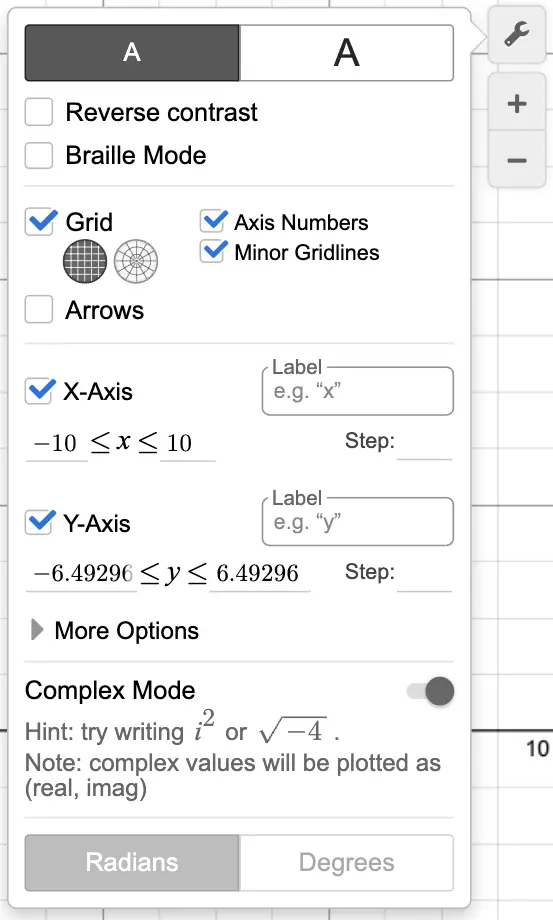
As shown in the image, there's a "Complex Mode" toggle in the settings menu. Turn it on to enable complex numbers.
What You Can Do with Complex Numbers
Complex Plane
When you input complex numbers like the examples below, they are automatically plotted on the complex plane.
1
2
Complex Number Operations
Desmos supports a variety of operations with complex numbers.
1
2
3
4
5
6
7
8
Advanced
You can also apply various functions to complex numbers.
1
2
3
4
5
6
7
For more details, check out the official Desmos help page:
Advanced Techniques with Complex Numbers – Desmos Help Center
Images are created with the Desmos Graphing Calculator, used with permission from Desmos Studio PBC.
© 2024 UNS Physics. All Rights Reserved.